

Contents
Introduction to Google Analytics
Why Google Analytics is important for businesses
Key features and benefits of Google Analytics
Setting up Google Analytics for your website
Understanding the different metrics in Google Analytics
Using Google Analytics for SEO optimisation
Analysing the effectiveness of your PPC campaigns with Google Analytics
Tracking social media traffic with Google Analytics
Using Google Analytics to measure the performance of your home page
Advanced tips and tricks for using Google Analytics
Conclusion
Introduction to Google Analytics
As the digital landscape continues to evolve, businesses are constantly looking for ways to optimise their online presence and drive growth.
One tool that has become indispensable in this endeavour is Google Analytics. With its robust features and comprehensive insights, Google Analytics empowers businesses to make data-driven decisions and maximise their online performance.
At its core, Google Analytics is a web analytics service that provides detailed information about website traffic and user behaviour.
By tracking and analysing data from various sources, it offers valuable insights into the effectiveness of marketing campaigns, user engagement, and conversion rates.
Why Google Analytics is important for businesses
Google Analytics is a game-changer for businesses of all sizes. By harnessing the power of data, it allows businesses to gain a deeper understanding of their target audience, optimise their marketing efforts, and drive tangible results.
Here are a few key reasons why Google Analytics is crucial for businesses:
1. Data-driven decision making
In today’s competitive landscape, making informed decisions is paramount. Google Analytics provides businesses with valuable data and insights that can guide their marketing strategies.
By understanding user behaviour, businesses can tailor their messaging, optimise their website, and create more targeted campaigns that resonate with their audience.
2. Measure website performance
Google Analytics enables businesses to track various metrics and KPIs to assess the performance of their website.
From bounce rates to conversion rates, businesses can gain a comprehensive view of how their website is performing and identify areas for improvement.
This data can help businesses refine their user experience, enhance website navigation, and ultimately increase conversion rates.
3. Track marketing campaigns
With Google Analytics, businesses can track the effectiveness of their marketing campaigns across different channels.
By analysing data such as click-through rates, conversion rates, and customer acquisition costs, businesses can identify which campaigns are driving the most value and allocate resources accordingly.
This ensures that marketing efforts are optimised and budget is allocated to the most effective channels.
Key features and benefits of Google Analytics
Google Analytics offers a myriad of features and benefits that empower businesses to gain deep insights into their online performance. Let’s explore some of the key features and benefits that make Google Analytics an essential tool for businesses:
1. Real-time reporting
One of the most powerful features of Google Analytics is its real-time reporting. Businesses can monitor their website traffic and user behaviour as it happens, allowing them to react quickly to any changes or trends.
Real-time reporting is particularly useful for businesses running time-sensitive campaigns or events, as it enables them to make data-driven decisions in real-time.
2. Customisable dashboards
Google Analytics allows businesses to create customised dashboards tailored to their specific needs.
This means that businesses can choose the metrics and reports that are most relevant to them and have them readily available in their dashboard.
Customisable dashboards provide businesses with a high-level overview of their key metrics, saving time and enabling them to focus on the data that matters most.
3. Advanced segmentation
Segmentation is a powerful feature of Google Analytics that allows businesses to divide their audience into meaningful groups.
By segmenting their audience based on various attributes such as demographics, location, or behaviour, businesses can gain deeper insights into different user segments and tailor their marketing efforts accordingly.
This enables businesses to create more personalised and targeted campaigns, leading to higher engagement and conversion rates.
Setting up Google Analytics for your website
Setting up Google Analytics for your website is a straightforward process that requires a few simple steps. Here’s a step-by-step guide to help you get started:
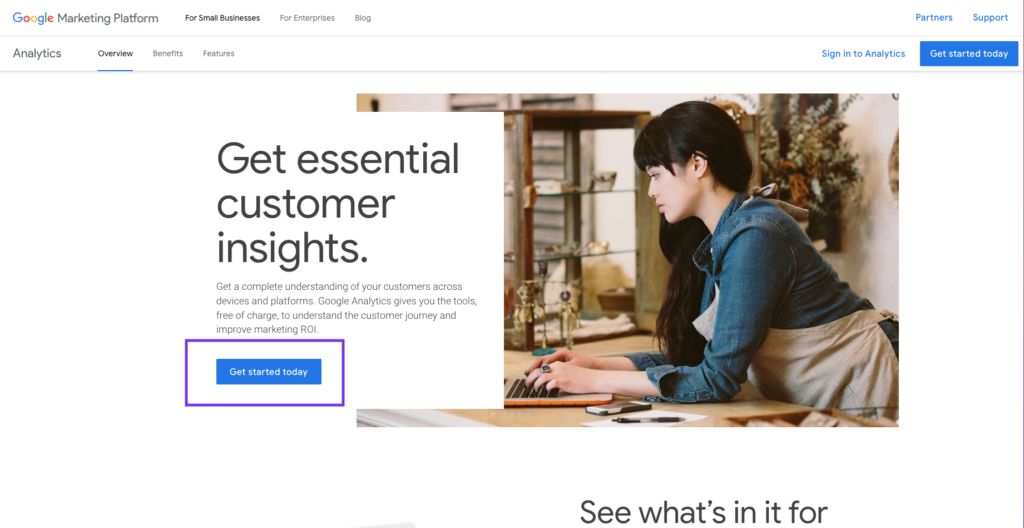
1. Create a Google Analytics account
The first step is to create a Google Analytics account. Visit the Google Analytics website and click on the “Start for free” button. You will be prompted to sign in with your Google account or create a new one if you don’t have one already.
2. Set up a property
Once you’re signed in, click on the “Admin” button at the bottom left corner of the screen. In the “Property” column, click on the dropdown menu and select “Create new property.” Follow the prompts to enter the details of your website, such as the website name, URL, and industry category.

3. Install the tracking code
After setting up your property, you will be provided with a unique tracking code snippet. This code needs to be added to every page of your website so that Google Analytics can track and collect data. You can either manually add the code to your website’s HTML or use a plugin if you’re using a content management system like WordPress.

4. Verify tracking
Once the tracking code is installed, it’s important to verify that it’s working correctly. Google Analytics provides a real-time reporting feature that allows you to see if data is being collected. Simply visit your website and check if your activity is being recorded in the Google Analytics dashboard.
Understanding the different metrics in Google Analytics
Once you have Google Analytics set up for your website, it’s important to understand the different metrics and reports available to you.
Here are some key metrics that you should familiarise yourself with:
1. Sessions
A session refers to a single visit to your website by a user. It starts when a user lands on your website and ends when they leave or remain inactive for a specified period of time. Sessions provide insights into the overall traffic volume and engagement on your website.
2. Pageviews
Pageviews represent the total number of times a page on your website has been viewed.
This metric helps you understand which pages are the most popular and engaging for your audience. By analysing pageviews, you can identify high-performing content and optimise underperforming pages.
3. Bounce rate
The bounce rate measures the percentage of users who leave your website after viewing only one page.
A high bounce rate can indicate that users are not finding what they’re looking for or that your website needs improvement. By analysing the bounce rate, you can identify areas where you can improve user experience and reduce bounce rates.
Using Google Analytics for SEO optimisation
Search engine optimisation (SEO) is crucial for businesses looking to improve their organic search rankings and drive targeted traffic to their website.
Google Analytics provides valuable insights that can help businesses optimise their SEO efforts.
Here are a few ways you can use Google Analytics for SEO optimisation:
1. Organic search traffic
Google Analytics allows you to track the amount of organic search traffic your website receives. By analysing this data, you can identify which keywords are driving the most traffic and optimise your content accordingly.
This can help you focus on keywords that are performing well and identify opportunities to improve your rankings for specific keywords.
2. Landing page performance
Understanding how your landing pages are performing is essential for SEO optimisation.
Google Analytics provides data on the performance of each landing page, including metrics such as bounce rate, average time on page, and conversion rate.
By analysing this data, you can identify which landing pages need improvement and make data-driven decisions to optimise them.
3. Referral traffic
Referral traffic refers to the visitors who come to your website from other websites. Google Analytics allows you to track referral traffic and identify which websites are sending the most traffic to your site.
By analysing this data, you can identify potential partnership opportunities, optimise your link-building efforts, and drive more referral traffic to your website.
Analysing the effectiveness of your PPC campaigns with Google Analytics
Pay-per-click (PPC) campaigns are a powerful tool for businesses looking to drive targeted traffic and generate leads.
Google Analytics provides valuable insights that can help businesses measure the effectiveness of their PPC campaigns and optimise their ad spend.
Here’s how you can use Google Analytics to analyse the effectiveness of your PPC campaigns:
1. Goal tracking
Setting up goals in Google Analytics allows you to track specific actions or conversions on your website.
By setting up goals for your PPC campaigns, you can track metrics such as conversion rate, cost per conversion, and return on ad spend.
This data enables you to measure the effectiveness of your campaigns and make data-driven decisions to optimise your ad spend.
2. Ad performance
Google Analytics provides data on the performance of your PPC ads, including metrics such as click-through rate (CTR), average position, and cost per click (CPC).
By analysing this data, you can identify which ads are performing well and optimise your campaigns accordingly.
This includes refining your ad copy, testing different ad formats, and adjusting your bidding strategy.
3. Audience insights
Google Analytics allows you to gain valuable insights into the audience that is interacting with your PPC campaigns.
By analysing data such as demographics, interests, and behaviour, you can identify which audience segments are most responsive to your ads.
This enables you to tailor your messaging, refine your targeting, and drive more qualified traffic to your website.
Tracking social media traffic with Google Analytics
Social media has become an integral part of every business’s marketing strategy.
Google Analytics provides valuable insights that can help businesses track and analyse the performance of their social media efforts.
Here’s how you can use Google Analytics to track social media traffic:
1. Social media referrals
Google Analytics allows you to track the amount of traffic your website receives from different social media platforms. By analysing this data, you can identify which platforms are driving the most traffic and engagement.
This enables you to focus your efforts on the most effective platforms and optimise your social media strategy accordingly.
2. Social media conversions
Tracking conversions from social media is essential for measuring the ROI of your social media efforts.
Google Analytics allows you to set up goals and track conversions from social media campaigns.
By analysing this data, you can measure the effectiveness of your social media campaigns, identify which campaigns are driving the most conversions, and optimise your social media strategy based on data-driven insights.
3. Social media engagement
Google Analytics provides data on the engagement levels of your social media traffic.
This includes metrics such as average time on site, pages per session, and bounce rate.
By analysing this data, you can gain insights into how engaged your social media audience is and identify areas for improvement.
This can help you refine your social media strategy, create more engaging content, and drive higher levels of user engagement.
Using Google Analytics to measure the performance of your home page
For businesses, measuring the performance of their home page is crucial.
Google Analytics provides valuable insights that can help businesses track and optimise the performance of their home page.
Here’s how you can use Google Analytics to measure the performance of your website home page:
1. Traffic sources
Google Analytics allows you to track the sources of traffic to your home page. By analysing this data, you can identify which sources are driving the most traffic and engagement. This enables you to focus your efforts on the most effective channels and optimise your marketing strategy accordingly.
2. Conversion tracking
Tracking conversions on your home page is essential for measuring the effectiveness of your marketing efforts. Google Analytics allows you to set up goals and track conversions on specific pages. By analysing this data, you can measure the conversion rate of your home page, identify areas for improvement, and optimise your marketing strategy based on data-driven insights.
3. User behaviour
Google Analytics provides valuable insights into the behaviour of users on your home page. This includes metrics such as bounce rate, average time on page, and pages per session. By analysing this data, you can gain insights into how engaged users are with your home page and identify areas for improvement.
This can help you refine your messaging, optimise your design, and create a more compelling user experience.
Advanced tips and tricks for using Google Analytics
Once you have a solid understanding of the basics, there are several advanced tips and tricks that can help you get even more out of Google Analytics.
Here are a few that you should consider:
1. Custom dimensions and metrics
Google Analytics allows you to create custom dimensions and metrics that go beyond the standard data points.
This enables you to track and analyse specific data that is relevant to your business.
For example, you can create a custom dimension to track the performance of different product categories on your e-commerce website.
By utilising custom dimensions and metrics, you can gain deeper insights and make more informed decisions.
2. Enhanced Ecommerce tracking
If you have an ecommerce website, implementing enhanced ecommerce tracking in Google Analytics is crucial.
This provides you with detailed insights into the customer journey, including product impressions, add to cart events, and purchase completions.
By analysing this data, you can identify trends, optimise your product offerings, and improve the overall customer experience.
3. Multi-channel funnels
Multi-channel funnels in Google Analytics allow you to track the entire customer journey across different marketing channels.
This includes tracking how different channels interact and influence each other in the conversion process.
By analysing multi-channel funnels, you can gain insights into the effectiveness of your marketing mix, identify touchpoints that drive conversions, and optimise your marketing strategy accordingly.
Conclusion
Google Analytics is a powerful tool that can provide businesses with valuable insights into their online performance.
By understanding the key features and benefits of Google Analytics, setting it up correctly, and utilising its advanced features, businesses can make data-driven decisions that drive growth and maximise their online presence.
Whether it’s optimising SEO efforts, analysing PPC campaigns, tracking social media traffic, or measuring website performance, Google Analytics is an indispensable tool for businesses looking to unleash their online potential.
Contact Rococo Digital to learn more about our marketing services and how we can help you leverage the power of Google Analytics to drive your business forward.